문제점
새 컴퓨터에 깃 프로젝트를 받아 5.7버전 언리얼 엔진을 실행하려고 하니, 아래와 같은 에러가 나며 실행이 되지 않았다.
Unhandled Exception: 0x80000003
npu_d3d12_umd
D3D12Core
D3D12Core
D3D12Core
D3D12Core
D3D12Core
D3D12Core
D3D12Core
D3D12Core
D3D12
D3D12
UnrealEditor_NNERuntimeORT!UE::NNERuntimeORT::Private::CreateD3D12Device() [D:\build\++UE5\Sync\Engine\Plugins\NNE\NNERuntimeORT\Source\NNERuntimeORT\Private\NNERuntimeORTUtils.cpp:53]
UnrealEditor_NNERuntimeORT!UE::NNERuntimeORT::Private::IsD3D12DeviceNPUAvailable() [D:\build\++UE5\Sync\Engine\Plugins\NNE\NNERuntimeORT\Source\NNERuntimeORT\Private\NNERuntimeORTUtils.cpp:353]
UnrealEditor_NNERuntimeORT!UE::NNERuntimeORT::Private::MakeRuntimeDml() [D:\build\++UE5\Sync\Engine\Plugins\NNE\NNERuntimeORT\Source\NNERuntimeORT\Private\NNERuntimeORT.cpp:434]
UnrealEditor_NNERuntimeORT!FNNERuntimeORTModule::StartupModule() [D:\build\++UE5\Sync\Engine\Plugins\NNE\NNERuntimeORT\Source\NNERuntimeORT\Private\NNERuntimeORTModule.cpp:106]
UnrealEditor_Core!FModuleManager::LoadModuleWithFailureReason() [D:\build\++UE5\Sync\Engine\Source\Runtime\Core\Private\Modules\ModuleManager.cpp:1236]
UnrealEditor_Projects!FModuleDescriptor::LoadModulesForPhase() [D:\build\++UE5\Sync\Engine\Source\Runtime\Projects\Private\ModuleDescriptor.cpp:797]
UnrealEditor_Projects!FPluginManager::TryLoadModulesForPlugin() [D:\build\++UE5\Sync\Engine\Source\Runtime\Projects\Private\PluginManager.cpp:2721]
UnrealEditor_Projects!FPluginManager::LoadModulesForEnabledPlugins() [D:\build\++UE5\Sync\Engine\Source\Runtime\Projects\Private\PluginManager.cpp:2858]
UnrealEditor!FEngineLoop::LoadStartupModules() [D:\build\++UE5\Sync\Engine\Source\Runtime\Launch\Private\LaunchEngineLoop.cpp:4610]
UnrealEditor!FEngineLoop::PreInitPostStartupScreen() [D:\build\++UE5\Sync\Engine\Source\Runtime\Launch\Private\LaunchEngineLoop.cpp:3846]
UnrealEditor!GuardedMain() [D:\build\++UE5\Sync\Engine\Source\Runtime\Launch\Private\Launch.cpp:146]
UnrealEditor!GuardedMainWrapper() [D:\build\++UE5\Sync\Engine\Source\Runtime\Launch\Private\Windows\LaunchWindows.cpp:123]
UnrealEditor!LaunchWindowsStartup() [D:\build\++UE5\Sync\Engine\Source\Runtime\Launch\Private\Windows\LaunchWindows.cpp:277]
UnrealEditor!WinMain() [D:\build\++UE5\Sync\Engine\Source\Runtime\Launch\Private\Windows\LaunchWindows.cpp:334]
UnrealEditor!__scrt_common_main_seh() [D:\a\_work\1\s\src\vctools\crt\vcstartup\src\startup\exe_common.inl:288]
kernel32
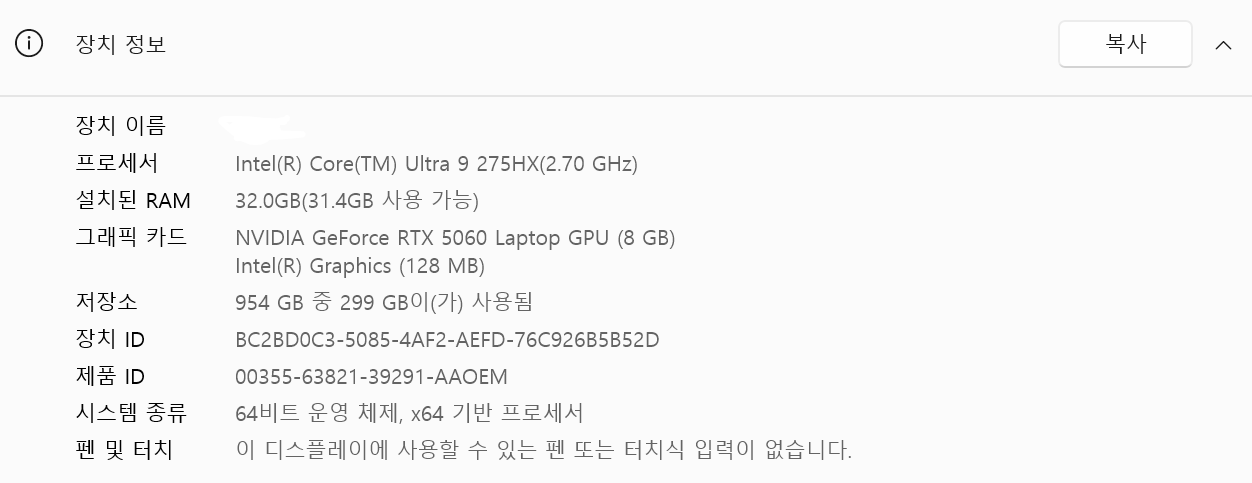
DX12나 그래픽 드라이버의 문제인가 하여 드라이버를 최신 버전으로 갱신하거나 SDK를 추가하거나 프로젝트 설정을 바꿔봐도 문제가 해결되지 않았다.
해결법
인터넷에 검색해보니 Intel AI Boost를 끄면 된다고 해서 실행했다.
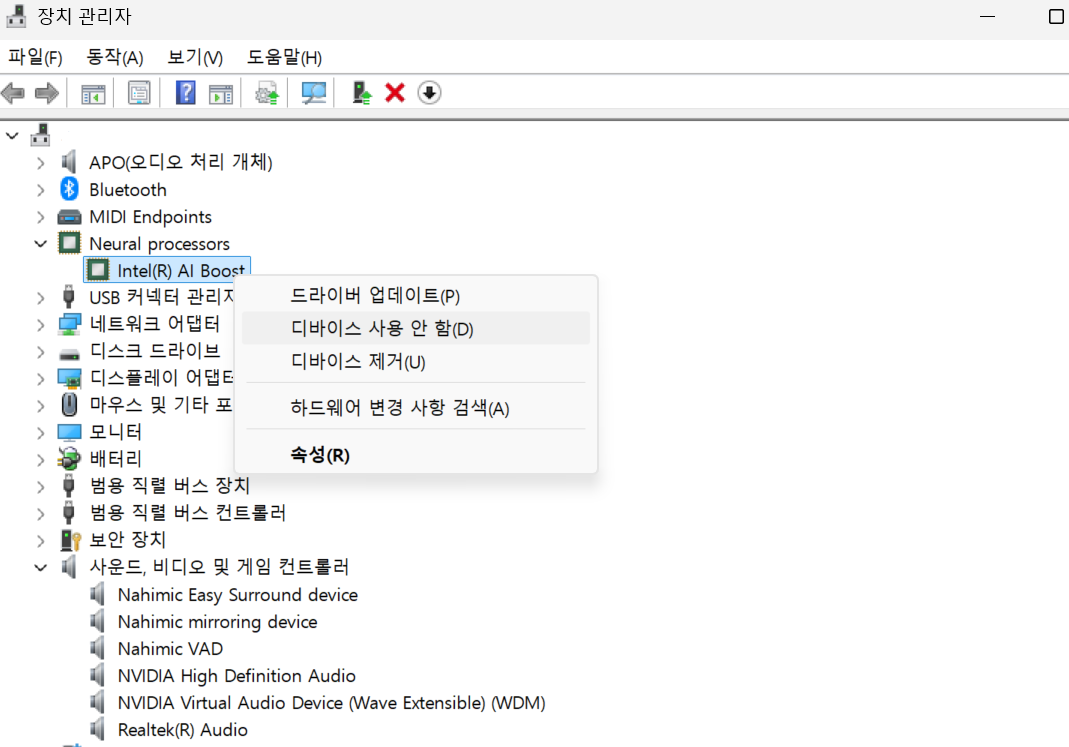
위와 같이 장치관리자에서 Intel(R) AI Boost를 사용 안 함으로 설정했더니 정상적으로 실행되었다.
'게임 개발 > 에러 해결' 카테고리의 다른 글
| XUnity.AutoTranslator DeepL API 인증 문제 해결 (0) | 2026.01.31 |
|---|